
Forecast overview: where this month's cost is heading
The Forecast overview shows where this month's cost is heading, for all subscriptions or one, in one currency: the cost recorded so far plus the Baseline forecast for the remaining days, set against the budget of the scope and against last month, with the subscriptions the forecast covers and the ones it leaves out.
What this page is for
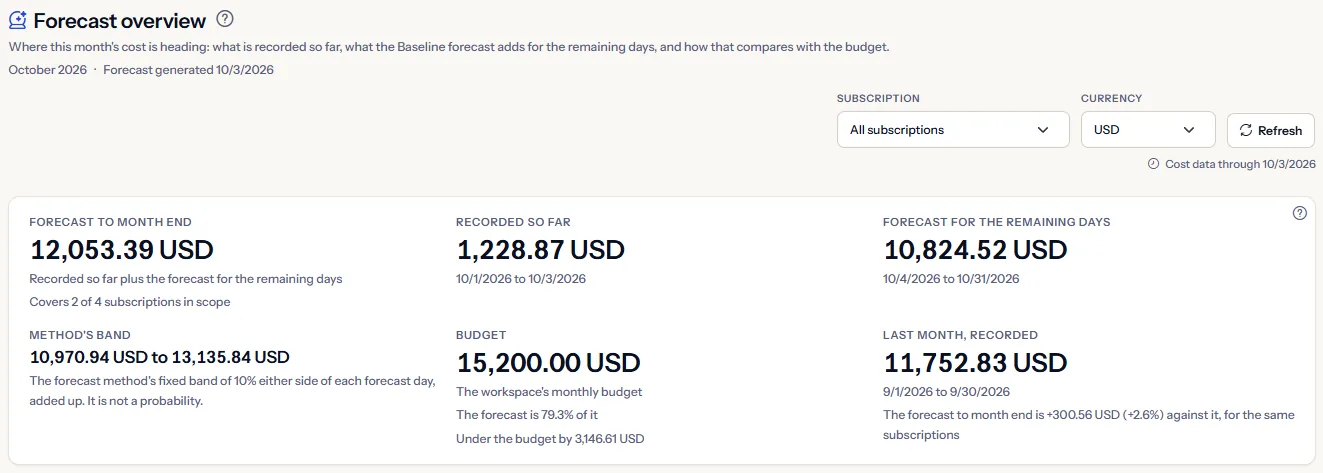
The “Forecast overview” page answers one question: where is this month's cost heading? For all subscriptions or one, in one currency, it adds the cost recorded so far this month to the forecast for the days that remain, and holds the result against the budget of the scope and against last month.
It is for the person who owns the monthly number: a FinOps practitioner, an engineering lead or a founder. It leads to one of three decisions before the month ends: act on the spend, create a Baseline forecast for a subscription the forecast leaves out, or accept the outlook. Nothing on the page changes anything in Azure.
The header names the month the page forecasts and, once a forecast is read, the date it was generated, both in UTC. The forecast tile of the Dashboard is calculated by the same rule; this page explains that figure and breaks it down.
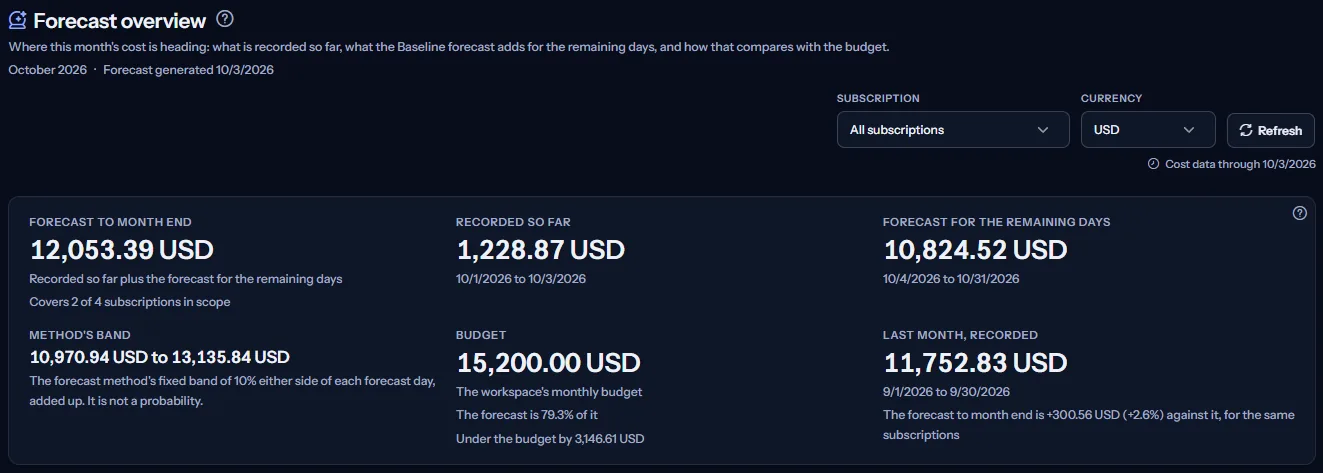
To open it, choose “Advanced” in the sidebar, then select “Forecast overview” under “Forecasting”. Its address opens in either mode.
Before you start
A forecast is made from the Azure cost CostGuard has imported, so the page needs a connection that has completed a cost import. Until then it shows “No cost data yet” and a button, “Open Getting started”.
Read the Getting started guide
Each subscription needs an active Baseline forecast scenario, created on the “Forecast scenarios” page. Its forecast is made by a forecasting run that takes place about once an hour, so the first forecast appears within about an hour of creating the scenario.
Forecasting is part of the Pro and Enterprise plans. On Free, Starter and Growth the page shows a labelled sample instead of your forecast.
Choose the scope: subscription and currency
Use “Subscription” to see “All subscriptions” or one subscription. With one subscription, every figure, the coverage, the day-by-day table and the budget are that subscription's.
“Currency” appears when the scope has cost in more than one currency. Every amount on the page is in that one currency: amounts in different currencies are never added, and no exchange rate is applied. Until you choose, the page uses the currency in which the most Baseline scenarios have a forecast.
There is no date range: the page always covers the current month in UTC, from its first day to its last. “Refresh” reads everything again.
“Cost data through” names the latest day with recorded cost. Azure reports cost a day or two late, so that day is usually before today, and the forecast fills the days after it. “Forecast generated” in the header is the date, in UTC, of the newest forecast the figures use.
The forecast figures
The first panel shows up to six figures, all in the currency of the scope:
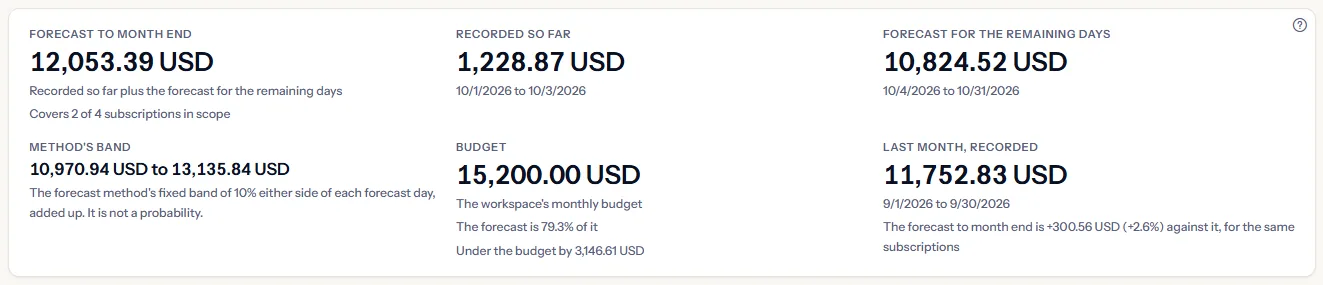
- “Forecast to month end”: “Recorded so far” plus “Forecast for the remaining days”. When the forecast leaves out some subscriptions in scope, a line under it says how many it covers, for example “Covers 2 of 4 subscriptions in scope”.
- “Recorded so far”: the cost recorded this month, from the first day to the latest recorded day, for the subscriptions the forecast covers. When nothing is recorded yet this month, the panel says so and the figure is forecast only.
- “Forecast for the remaining days”: the forecast of each covered subscription, added up, from the day after the latest recorded day to the last day of the month.
- “Method's band”: the recorded cost plus the lower, then the upper, values of every forecast day, explained below.
- “Budget”: the monthly budget of the scope and how the forecast compares with it, explained below.
- “Last month, recorded”: last month's recorded cost of the same subscriptions, and the change of the forecast against it.
The method's band
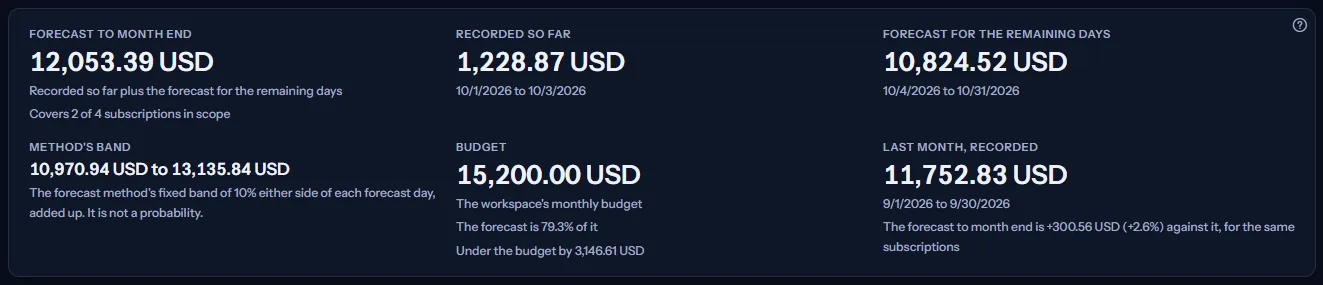
Every forecast day carries a band of 10 percent either side of its forecast, fixed by the forecast method. “Method's band” adds those days up and puts the recorded cost in front of them. It is not a probability, and it does not measure how likely the forecast is: it shows how far 10 percent either way would move the month.
The budget
For “All subscriptions”, “Budget” is the workspace's monthly budget. For one subscription, it is that subscription's enabled budget, a monthly one first when it has several. Both are set on the Budgets page.
When the budget is in the currency of the scope, the panel shows the forecast as a share of it and by how much the forecast is over or under it. Over the budget is the only figure the page marks in amber, because it is a risk.
Otherwise the panel says why there is no comparison: the budget is in another currency, as in “The budget is in EUR. Amounts in different currencies are never compared.”; the subscription's budget is not monthly; no monthly budget is set, “No monthly budget is set for this scope.”; or the budget could not be read, in which case the forecast is shown without it.
Last month
“Last month, recorded” is the cost recorded from the first to the last day of last month for the same covered subscriptions, in the same currency. Under it, the change of the forecast to month end against it, as an amount and a percentage. When nothing was recorded last month for those subscriptions, no change is stated. When last month could not be read, the panel says so and the forecast is shown without it.
Limits to know
Every amount on the page is an estimate made from recorded cost. It is not a bill, and the invoice for the month can differ from it.
Coverage: the subscriptions the forecast covers
“Coverage” says how many subscriptions in scope have a Baseline forecast in the chosen currency that reaches the end of the month. A subscription is in scope when it has cost recorded this month in that currency, or a forecast that covers it.
Every other subscription is listed by its name, or by the end of its identifier when the name cannot be read, never the whole identifier, with the reason it is left out:
- “No active Baseline forecast scenario”: create one on “Forecast scenarios”.
- “Baseline scenario active, no forecast generated yet”: the scenario exists, but no forecasting run has produced its forecast yet.
- “Forecast stops before the end of the month, or misses a day”: the forecast has no value for one or more days between the day after the latest recorded day and the end of the month, most often because the scenario forecasts fewer days than that.
- “Forecast is in another currency”: choose that currency under “Currency” to see it.
- “Not read: more Baseline scenarios than one read covers”: the page reads the forecasts of at most 25 subscriptions at a time; the rest are named here and not added.


A subscription whose forecast stops early is left out rather than added in part, so the forecast to month end is never understated by a forecast that ends before the month does. “Open Forecast scenarios” opens the page where Baseline scenarios are created.
Day by day this month
“Day by day this month” lists every day of the month in the currency of the scope: the recorded days up to the latest recorded day, marked “Recorded”, then the forecast days to the end of the month, marked “Forecast”.
Each row gives the date, the kind, a bar and the amount. The bars are drawn against the largest day of the month. Recorded and forecast days differ by colour and by the word in “Kind”, so colour is never the only key, and a screen reader reads the table without the bars.
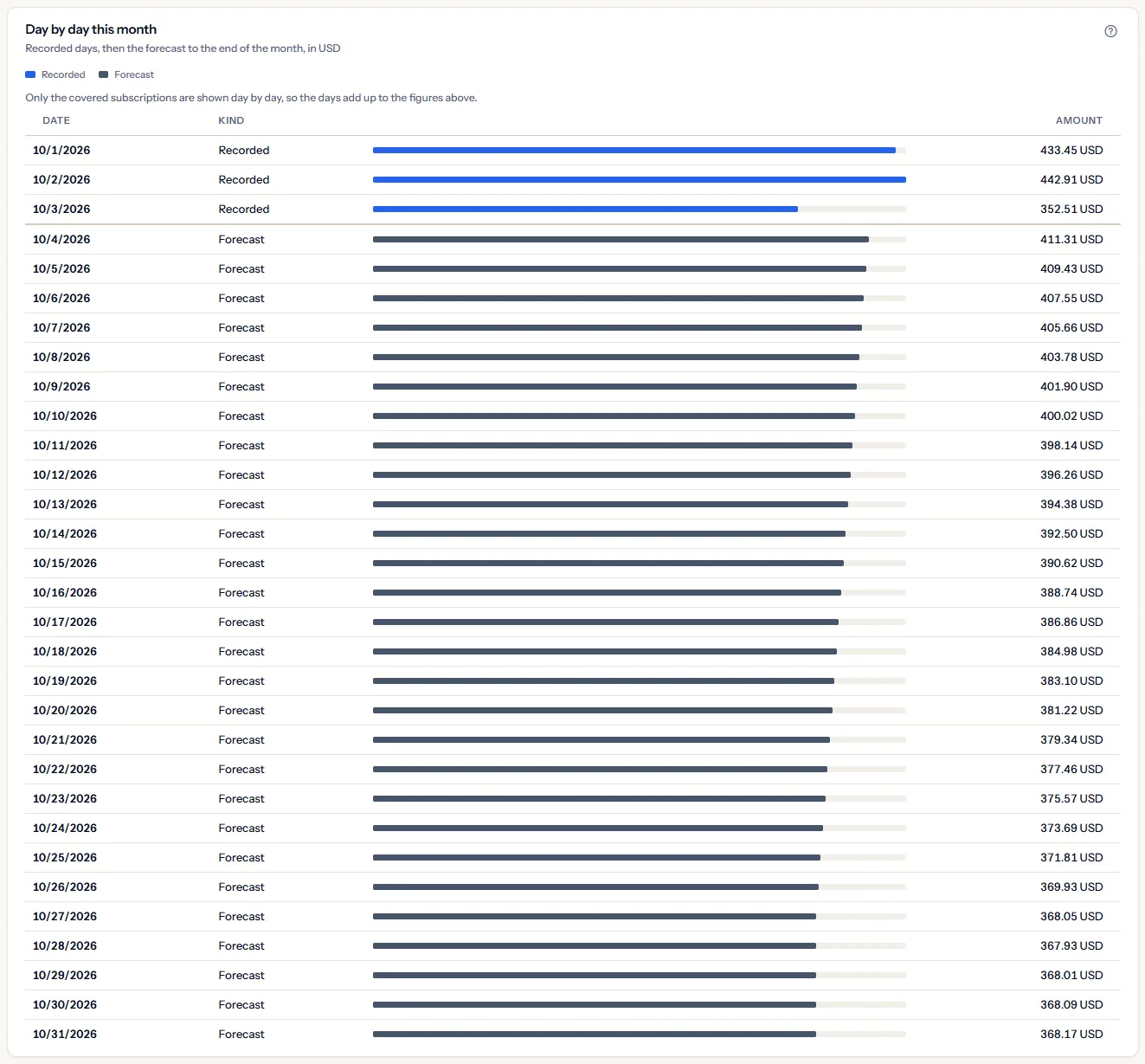
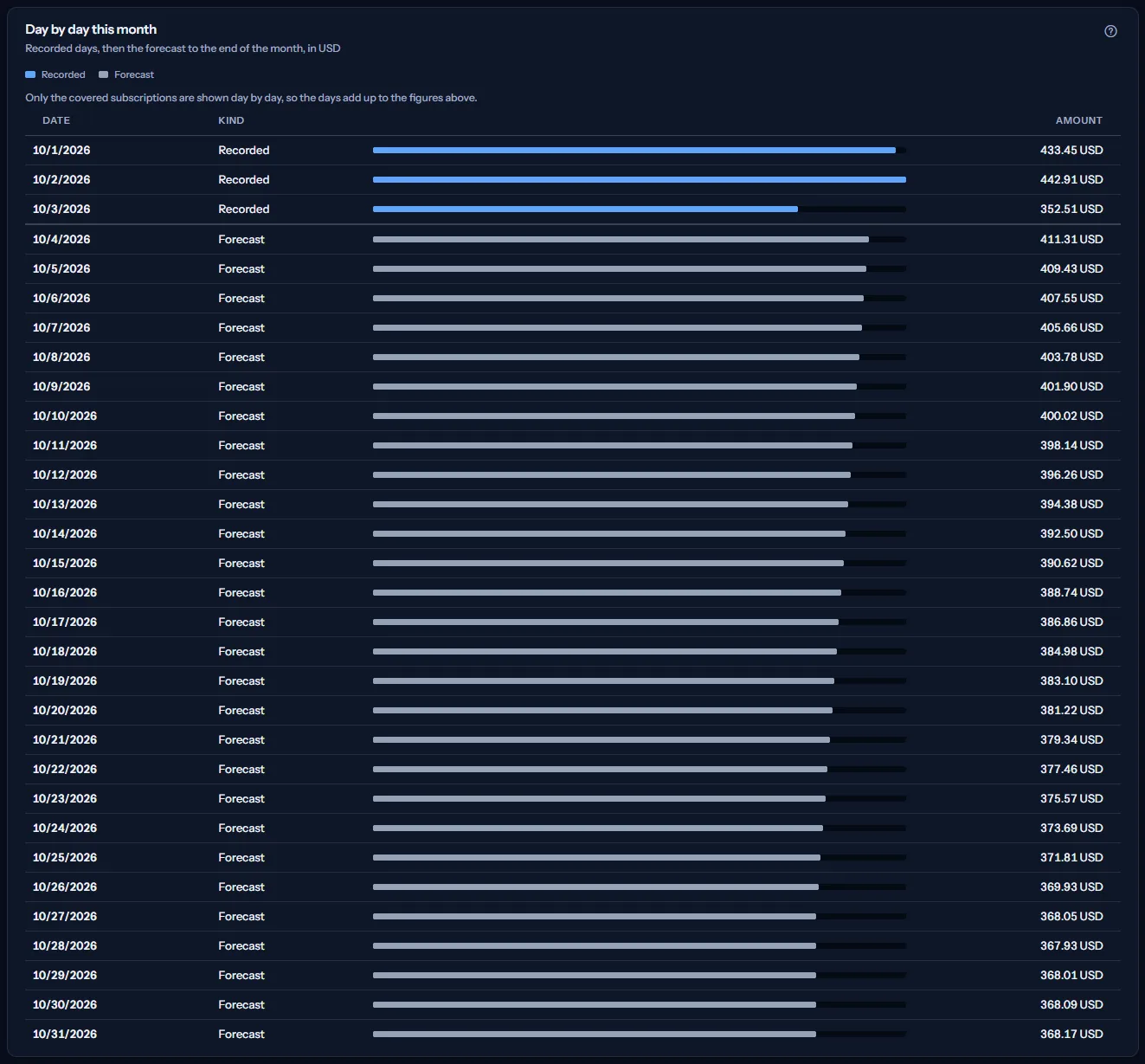
For all subscriptions with some left out, the table shows only the covered subscriptions, so its days add up to the figures above, and a line under the key says so.
By subscription
“By subscription” lists each covered subscription by its name, or by the end of its identifier when the name cannot be read, never the whole identifier, with these columns:
- “Recorded so far”: its cost recorded this month.
- “Remaining forecast”: its forecast for the days after the latest recorded day.
- “Forecast to month end”: the two added together.
- “Scenario”: the name of the Baseline scenario the forecast comes from.
- “Generated (UTC)”: the date its forecast was last generated.


Each subscription appears once, with one scenario: the forecast of a subscription is never added twice.
How the forecast is made
A forecast belongs to one subscription of one Azure connection. For each active Baseline scenario, the forecasting run takes the subscription's recorded daily cost, one currency at a time, and:
- averages its latest seven days with recorded cost, or all of them when fewer are recorded;
- once fourteen or more days are recorded, adds a daily trend: the difference between the average of the latest seven days and of the seven before them, spread over the days ahead;
- applies the scenario's growth adjustment, a percentage set on the scenario;
- starts the day after the latest recorded day and continues for the scenario's number of forecast days, never below zero on any day;
- puts a band of 10 percent either side of each forecast day.
The run repeats about once an hour for every active scenario of a workspace whose plan includes forecasting. Each run replaces the earlier forecast of the scenario, and days it no longer forecasts are removed.
Only Baseline scenarios count on this page. When a subscription has more than one active Baseline scenario, the most recently updated one counts. Optimistic, conservative and custom scenarios are alternative views, compared on “Scenario Comparison”.
Note
The panel “How this forecast is made” at the bottom of the page states these points in short.
Go further
The links at the bottom of the page lead on:
- “Budgets”: create a budget for the scope, or change one.
- “Cost trend” and “Cost by service”: find which days and which services drive the month.
- “Forecast scenarios”: the scenarios behind the forecast, where a Baseline scenario is created.
- “Scenario comparison”, “Risk indicators” and “Confidence bands”: the other pages of the “Forecasting” group.
What you may see instead of figures
While the page reads, grey bars stand where the figures will appear, and a screen reader announces “Reading the forecast”. After that, the page may show one of these instead of figures:
- “No cost data yet”, with “Open Getting started”: no connection has imported cost yet.
- “No Baseline forecast for this scope”, with “Open Forecast scenarios”: no subscription in scope has an active Baseline scenario.
- “The forecast has not been generated yet”: an active Baseline scenario exists, and the next forecasting run will produce its forecast.
- “No forecast reaches the end of the month in USD”: there are forecasts, but none covers every remaining day in that currency. The coverage panel below lists each subscription and why.
- “The forecast could not be read”, with “Try again”: the forecast could not be read. Nothing is shown rather than a figure that may be wrong.
- A budget or last month that could not be read says so in its own place; the forecast is still shown.
- “The subscription names could not be read, so subscriptions are named by the end of their identifier.” above the figures: the names could not be read, and the forecast is still shown.
- A notice that your session has expired, with a link to sign in again. The page shows no figures until you do.
When you switch workspace, the page clears what it showed, checks the plan of the new workspace and reads its forecast.
Sample data when your plan has no forecasting
When your plan does not include forecasting, the page shows a fixed example under the label “Sample data”, with the sentence “Your current plan does not include this feature. The figures shown here are an example, not your data.”
The sample shows an example month, August 2026, for three Contoso subscriptions in US dollars: two covered by a Baseline forecast and one left out, with the figures, the coverage, the day-by-day table, the by-subscription table and the notes. It has no scope bar, and it is the same for everyone, never your data.
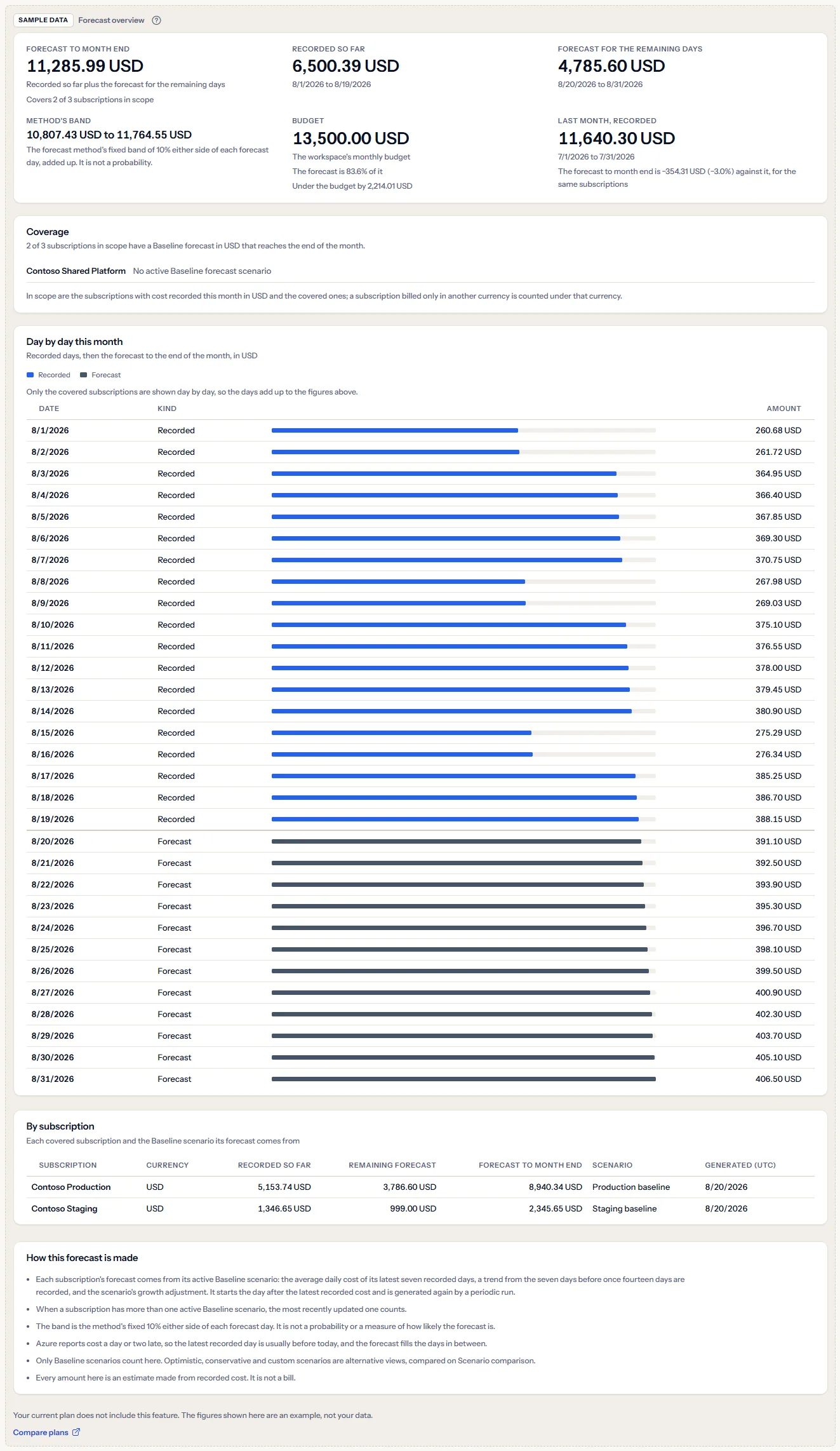
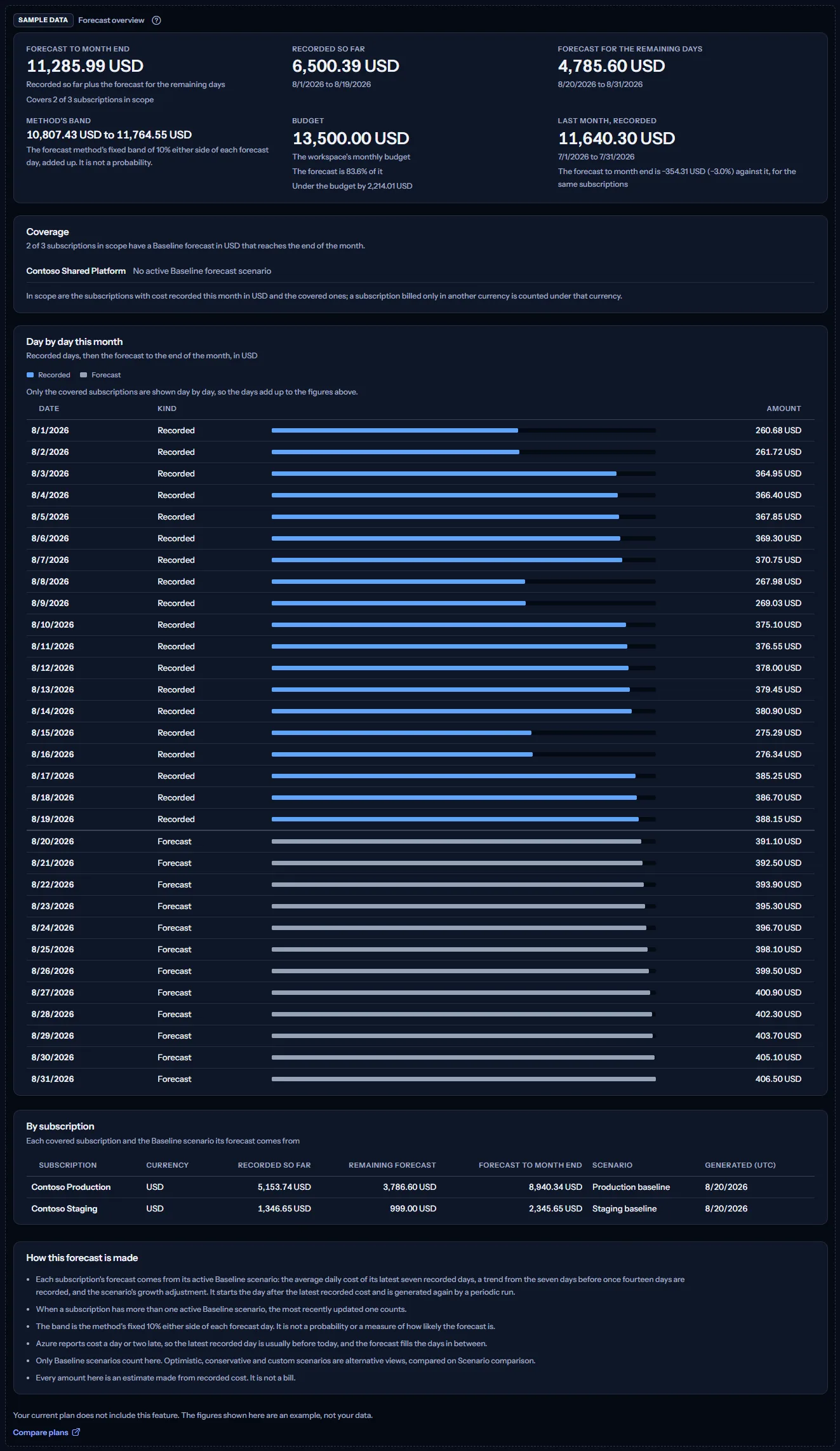
“Compare plans” opens the pricing page in a new tab. CostGuard decides what your plan includes on the server; the sample is only how the page shows it.
What each plan includes
The table shows the first plan that includes each part of the page. Every plan above it includes it too.
| Feature | Free | Starter | Growth | Pro | Enterprise |
|---|---|---|---|---|---|
| A labelled sample of the page | Included | Included | Included | Included | Included |
| The Forecast overview with your own forecasts | Not included | Not included | Not included | Included | Included |
Pro and Enterprise include the Forecast overview with your own forecasts; Free, Starter and Growth show the labelled sample. The plan is checked on the server, and the page never shows a price.
Troubleshooting
The page says “No Baseline forecast for this scope”
No subscription in scope has an active Baseline forecast scenario. Open “Forecast scenarios” and create one for each subscription you want forecast. Only Baseline scenarios count on this page.
I created a scenario and the page says “The forecast has not been generated yet”
Forecasts are made by a run that takes place about once an hour, so wait for the next one and select “Refresh”. A run forecasts only a subscription that has imported cost, and only in a workspace whose plan includes forecasting.
A subscription is missing from the forecast to month end
Look at the coverage panel: it names every subscription left out and the reason. A subscription whose cost is only in another currency is counted under that currency; choose it in the scope bar.
The coverage says the forecast stops before the end of the month
A forecast covers the scenario's number of forecast days, counted from the day after the subscription's latest recorded cost. When that number is too small, or the subscription's cost data is several days old, it ends before the month does, and the subscription is left out rather than understated.
Recorded so far is lower than the month's cost on other pages
For all subscriptions, the figure counts only the subscriptions the forecast covers, so that the recorded and the forecast parts belong to the same subscriptions. A subscription left out adds nothing, recorded or forecast; the coverage panel names it.
The page is not in the sidebar
The sidebar lists it in “Advanced” mode only. Choose “Advanced” at the top of the sidebar; the page's address opens in either mode.